408
408
As of May 26, 2026, you now have the option to receive verification codes via text message and email as an alternative to using an authenticator app (CougarLock). Please note that role accounts and a small list of specific users will still need to use an authenticator app for security reasons.
Information on file not up to date?
Students/Alumni
Please fill out the Registrar Personal Information Update Request Form! Feel free to reach out to the Student Services Center (SSC) at [email protected] for assistance with updating your information on file.
Fac/Staff
Please visit the HR Total Access site to update this information! Feel free to reach out to Human Resources for assistance with updating your information on file if you do not have access to your account.
Please note that the IT Chatbot is available at support.apu.edu 24/7 to assist you with password resets!
How to use SMS Codes/Email to Sign In
1. When you attempt to sign into your APU Account, you will be prompted to enter your NetID and password. Please enter your APU NetID and password.
2. You should see the page shown below:
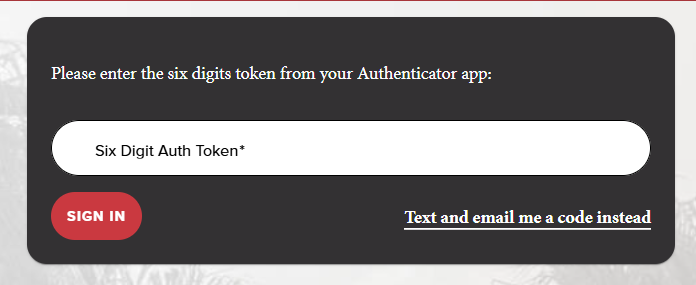
Select "Text and email me a code instead"

3. You will be sent a code to your phone number and email on file. Enter the code and hit "Sign In."
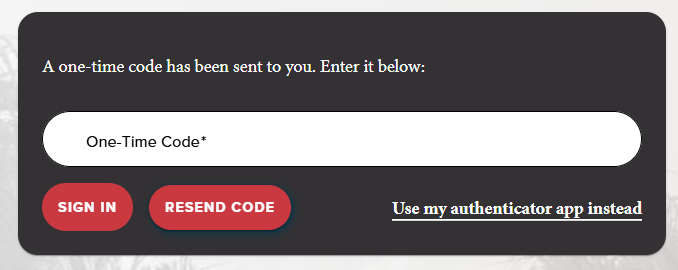
4. You should now be signed in! Alternatively, you are also able to select "Use my authenticator app instead" if you would like to proceed with your 6-digit codes from your authenticator app.