


 162
162
APU Now: How to Log in and Get Started
What is APU Now?
APU Now is the official university mobile application, serving as your “virtual cougar walk” for connecting with the APU community, accessing essential resources, and staying informed about campus events.
Download APU Now
Download APU Now today to ensure you have everything you need to start thriving at APU.
Click here to download APU Now!
Getting Started
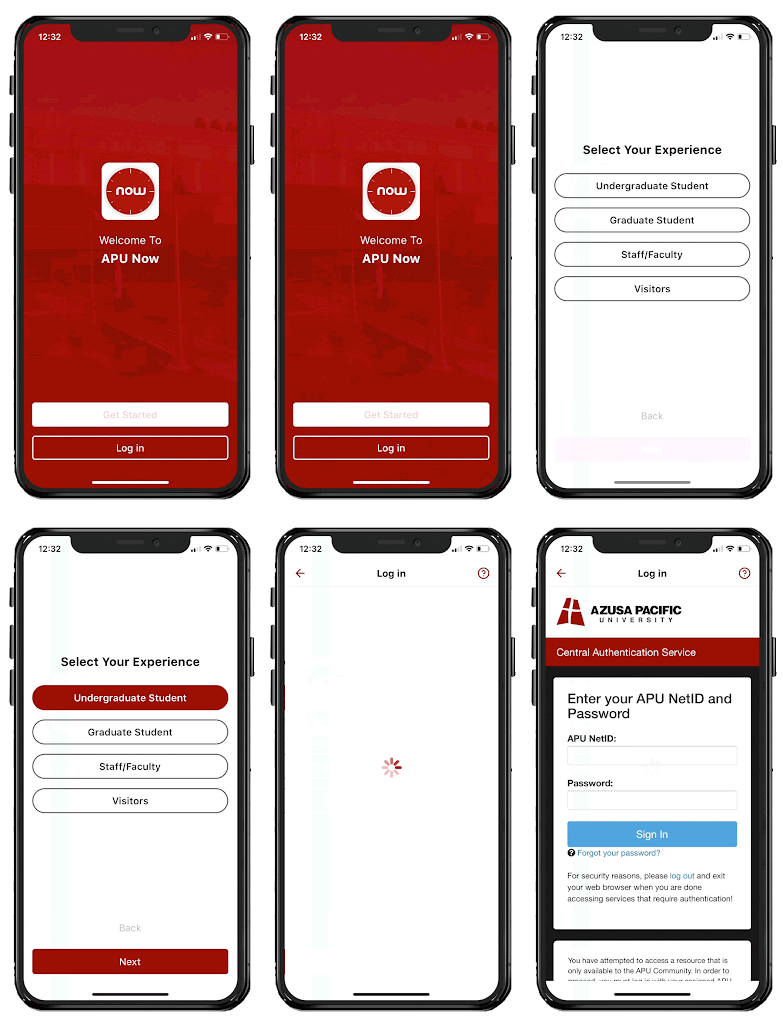
Logging In
- Tap “Get Started”
- Choose your campus
- Choose your App Experience (Undergraduate, Graduate, Staff/Faculty)
- Sign in with your APU NetID and password
Connect on the Student Feed
Engage with peers, ask questions, and share experiences right from the start.
- Access the feed by tapping the speech bubble icon on the bottom menu.
- Tap “What’s on Your Mind?” at the top of the feed to create your first post.
- Use the like and comment buttons to interact with others’ posts.
Trolley Tracker (Real-Time ETA)
Ensure timely arrivals to class or chapel by tracking the campus trolley in real-time.
- Tap the Campus icon on the bottom menu.
- Scroll to the “For Me” section.
- Select the Trolley Tracker tile to see the Estimated Time of Arrival (ETA) and the status of active trolleys (Red, Green, Orange).
Virtual ID / One Card
Access a scannable virtual version of your ID card for library checkouts and meal swipes, eliminating the need to carry your physical card.
- Tap the Campus icon on the bottom menu.
- Scroll to the “For Me” section.
- Select the ID / One Card tile.
Tip: Flip the card within the app to view your Meal Plan details, current Balance, and dining hall hours.
APU Deals Now (Local Discounts)
Save money with exclusive deals and discounts offered through our partnerships with local area businesses.
- Tap the Campus icon on the bottom menu.
- Scroll to the “Student Resources” section.
- Select the APU Deals Now tile.
Check back frequently for new offers and opportunities to connect with local community partners.
Reporting Issues
We want to keep APU Now as up-to-date as possible to make it as useful for our community as possible. If something looks incorrect or out of date please use our Ticket Form to submit so that our team can work on updating the information as quickly as possible.

